

Embedded Payment
Embedded Integration
The Embedded Integration allows you to integrate a seamless payment experience directly on your website, enabling customers to choose from payment methods that are enabled for your account. With a single integration, you can offer a unified checkout interface that blends perfectly with your website’s design, providing a consistent and user-friendly experience. This ensures that customers can easily select their preferred payment method and complete transactions in just a few clicks.
Key Features
- PCI DSS Compliance: MyFatoorah handles all PCI DSS requirements; no certification needed on your end
- Unified Integration: A Single JavaScript library supports all payment methods
- Flexible Payment Options: Embedded and Hosted Methods Together
- Customizable UI: Control which payment methods to display and handle redirections
Supported Payment Methods
Embedded Payment Methods (processed on your page without redirection):
- Cards (Visa / Mastercard / AMEX, etc.)
- Apple Pay
- Google Pay
- STC Pay
Other Payment Methods (Hosted):
- MyFatoorah automatically shows all payment methods enabled in your account. Payments not supported in embedded will redirect to the hosted payment page.
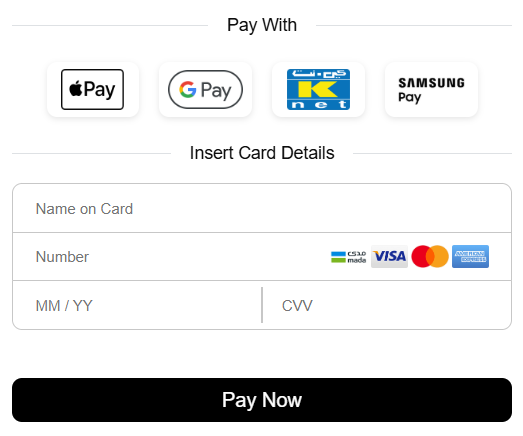
Embedded Integration View
Enable Payment MethodsTo enable payment methods on your Live account, please contact your Account Manager.
To enable payment methods on your Demo account, kindly send a request to [email protected] .
Before You Start
Prerequisites
- MyFatoorah Demo Account: Create your test account at MyFatoorah Portal
- API Key: Generate your test API key from the portal (or you can also use a test token here)
- Webhook Configuration: Set up a webhook endpoint to receive payment status notifications
Environment URLs
| Environment | API Base URL |
|---|---|
| Sandbox | https://apitest.myfatoorah.com/ |
| Kuwait, Bahrain, Jordan, Oman | https://api.myfatoorah.com/ |
| UAE | https://api-ae.myfatoorah.com/ |
| Saudi Arabia | https://api-sa.myfatoorah.com/ |
| Qatar | https://api-qa.myfatoorah.com/ |
| Egypt | https://api-eg.myfatoorah.com/ |
ImportantAlways use the /v3/endpoint for this integration.
For example: https://apitest.myfatoorah.com/v3/sessions
Older versions /v2 should not be used for new integrations.
Apple Pay PrerequisitesTo enable Apple Pay, you must verify your domain. For detailed instructions, please refer to our Apple Pay Domain Verification Guide.
Integration Modes
MyFatoorah Embedded integration offers two distinct integration modes to suit different business needs:
1. Complete Payment Mode (Default)
- Use when you want the entire payment process to happen in one API call.
- Ideal for simple checkout flows.
2. Collect Details Mode
- Use when you want to collect payment details first, and then complete payment.
- Ideal for complex pricing scenarios or when the final amount may change.
How it works
Mode 1: Complete Payment
This mode handles the entire payment process in a single flow, ideal for straightforward payment scenarios.
Step 1: Create Payment Session
Make a server-side API call to create a new payment session. You need to do this for each payment separately. SessionId is valid for only one payment.
Endpoint:POST /v3/sessions (Create Session)
{
    "PaymentMode": "COMPLETE_PAYMENT",
    "Order": {
        "Amount": 10
    }
}
{
"IsSuccess": true,
"Message": "Created Successfully!",
"ValidationErrors": null,
"Data": {
"SessionId": "KWT-68814db6-7510-4005-ada9-408aae9f373c",
"SessionExpiry": "2025-10-02T00:52:35.6000597Z",
"EncryptionKey": "m2QTkGqSxy24hpRGmoJ50vk6cfz4VJITNxGe5/uO+Qo=",
"OperationType": "PAY",
"Order": {
"Amount": 10.0,
"Currency": "KWD",
"ExternalIdentifier": null
},
"Customer": {
"Reference": null,
"Cards": null
}
}
}Step 2: Initialize Client-Side Integration
Include JavaScript Library:
// Test Environment
<script src="https://demo.myfatoorah.com/sessions/v1/session.js"></script>

// Live Environment For Kuwait, Bahrain, Jordan, and Oman
<script src="https://portal.myfatoorah.com/sessions/v1/session.js"></script>

// Live Environment For UAE
<script src="https://ae.myfatoorah.com/sessions/v1/session.js"></script>

// Live Environment For Saudi Arabia
<script src="https://sa.myfatoorah.com/sessions/v1/session.js"></script>

// Live Environment For Qatar
<script src="https://qa.myfatoorah.com/sessions/v1/session.js"></script>

// Live Environment For Egypt
<script src="https://eg.myfatoorah.com/sessions/v1/session.js"></script>
Create Container Element:
You need to define a div element with a unique id attribute. The Unified Session will be loaded inside this div after passing the div id to the configuration variable.
<div id="embedded-sessions"></div>Configure and Initialize:
Now you need to add the configuration variables. Place the following snippet in a new script tag after loading the JavaScript library, and replace the sessionId parameter with the "SessionId" you receive from the POST /v3/sessions Endpoint.
var config = {
  sessionId: "KWT-68814db6-7510-4005-ada9-408aae9f373c", // Add the "SessionId" you received from POST Session Endpoint.
  callback: payment, // MyFatoorah triggers this callback after the customer completes payment, either by submitting card details, finishing Google Pay / Apple Pay / STC Pay, or choosing any hosted payment method.
  containerId: "embedded-sessions", //Enter the div id you created in previous step.
  shouldHandlePaymentUrl: true // Default true
};

myfatoorah.init(config);

function payment(response) {
  console.log(JSON.stringify(response));
}
Step 3: Handle Payment Response
The callback function response depends on shouldHandlePaymentUrl setting in the config object and the payment method chosen.
-
If shouldHandlePaymentUrl: true (default):
-
Embedded Methods (Card/Apple/Google/STC Pay):
MyFatoorah handles the OTP page. After that, you will receivepaymentCompleted: true(This does not indicate the payment status, only that the payment flow was completed successfully). To retrieve the actual payment status, use thepaymentDatareceived in the callback function along with theEncryptionKeyobtained from the POST session endpoint to decrypt the response and determine the final payment status.{ "isSuccess": true, "sessionId": "KWT-82b22745-c777-436a-a30f-dc89c06f333b", "paymentCompleted": true, "paymentData": "GA7UWznbZznsnkm5CILO0CRoYF0z1Fbnk+5Yp7Hb53+dRsAMrZE3SlDAveN/g6hnv3zhQKWMPxbn73ul7//Db2uMiA2QOTeXMJi+vkjxX4uynpF4mcY/EOU29ZExpM/FfCQe1p34NJjaPEJ8APvqM0s1NPWLV0Qg8eNnrEMKbTAFUeYuAWmaGa5gfdDdVHvcksCw4SQTs1MCCTxM2sdOeBKGz/FD75nmsphrhl8bTrDWzVMx6JvalOTONg9rg2gVsXDwnpwT6CTbR9mlkW1UHsxecOXcGPYBfVh8LhuaLCQmKw6msPEoaVvJs02cQALTAOOZdQOEMRxk3hgUrdlTWwgzRs/Ud+XYK4ZRH4r6VRSM3S8oVbZs4WVuPZAKcRqqRaxT/quiEZmrnZbGE+XWpAl8qCE0idN9xYGGtmBQXTxQQUThLGtNirSUlLNUT7sTVwb5qHjhw9zSQTc01nO8unBvZFrBfavymsg7dLmBTeF1rGxsCkp4s72yXgPCsLS+XlVCQdOz1d1kEAx8ZkGAvAh7tPS+bA1d3YghRco4JOpYD+sTpGJM72ngsKGst+PiyQbvxoMuKMnN7fCU8ZAPEy9CRWi3DqIM2mHKrF6qo9kLaxD1LqD1FJUZ4oK6ueh5bFWFGatbg4QW5hYiZ/hkd4UBNfSl0RygU6u/UpnwAeIBzN9i+cSTa+QDylKmxnDUK+MVI8PzT7dq9tkNYBpuK/az/bG1DgqD5UTGDINBIHlWtgZ0c0OzkR8Xto7MA/VpAdi0BSAEr5lmpjZ/LDSr1j3rxjvdRi92Uockp9iFGZiYi8JabYikZhb/AlXa1fhmwcvXuGQmZqbFwNI8zyqX5O7JEuD7UDZ3GQiXk4gQl1Vn/1T6eiH0dTfQ+EMczdFvnpCGzdt2j6jJ17AEjVV814UjY4spI6Hii1uKTQEuY8ftXXqpyHD5CROhBCmsIrOrR1HXrP58y7D8FmeMOy4IhtUmO/fDj3JjSJ2oDvMRZsTzaYMUyhzfOZXZ9vl8hNY61ObgMh9EXsoSX5zRjsRfabi+0GG//+Efm/5ahmBKFj+RuGtBrpttB75M1h4LsWnBa7iBeq3cqOSzvuqlJZPeWaN1MTrdeH+lyWciMzlRIEXuIWWGqRpEpjOKKfpdpx6LPdYYWtGJwgctKvrftEqxEyWPabBAvCNq/lzxZJpn5WBjhaZn0h8h+yazcWBwzYDoxktvm9nY8cPvk9RQvcp3CPvYfSviSFnMtkd/LAVsi2pTOUik0Xg3vvLNWGTVc6USjWIo+sZoFI4Q3GaVW8d3L0twI1N0l7YMVzK/xL0rx2fcFMLuXMcY6kGC3npTQSH603CjO+6adqnhoJ7Ah3eFidBvqsItaTUR9QRc396Sa52uRp7KPiRqkTqy03jFEQ611X4KCa+ZRbw1oZmpLcUdsOmfl7ETbmcPBzKF0aXlbBArCddv0YPQK1OrxsquV/9mZI5AAVDDXJShaYrlQ9+CKgGuLDp6hGX1mYEjWEc+yR5iAm/T7nrfHKZz/DuFD3V+ok0Upni1HQbHJ3AQj6qhwQ==", "paymentType": "CARD", "redirectionUrl": "https://demo.MyFatoorah.com/En/KWT/PayInvoice/Result?paymentId=07076389179322432673" }Here is a sample code snippet showing how to decrypt
paymentDataand get the actual payment status:from Crypto.Cipher import AES from Crypto.Util.Padding import unpad import base64 def decrypt_with_key(encrypted_text, encryption_key): try: # Decode base64 encrypted text and key encrypted_text_bytes = base64.b64decode(encrypted_text) pass_bytes = encryption_key.encode('utf-8') # Prepare 16-byte key (128-bit) encryption_key_bytes = bytearray(16) len_pass = min(len(pass_bytes), len(encryption_key_bytes)) encryption_key_bytes[:len_pass] = pass_bytes[:len_pass] # Initialize AES cipher in CBC mode cipher = AES.new(bytes(encryption_key_bytes), AES.MODE_CBC, iv=bytes(encryption_key_bytes)) # Decrypt and unpad decrypted_bytes = cipher.decrypt(encrypted_text_bytes) decrypted_text = unpad(decrypted_bytes, AES.block_size) return decrypted_text.decode('utf-8') except Exception: return "FAILED" # Input values encryption_key = "m2QTkGqSxy24hpRGmoJ50vk6cfz4VJITNxGe5/uO+Qo=" encrypted_text = "AycwHsyRddykBFQ1Nojm+E/tQLa0eUiHDBTBjC+QUz5zWANVbCtQV4aOZZd4FBcUGv3fG3wJHTs4C0G1JoiZS49c4KCY1ePKWLUV14ZWcn2VCUU5KtWkJI3WTVxUBJgXKK1gzTVH7KMVSLCgnjaO5cBm+GNMBohn929BUi8BSJX8LvSJDwq8a1mFmdCgbLuZ7ozqCcJchlPRj4/Pfx1ihjyzhrOyY2q9610t+QjdXKokON31EFBRQK6LIbaYBi9fghMpbxrrDIBAbCdnKhN+sWuWD6/AD7KSbYS+A0OzsbZ/EDvCrk7H+IkvxsrgnaiFPwb7pa83ZfXJUsLDG7fB3NK9m3KqaG0ScVQZ8hMVKS3NQi+kHoMZmuNEhvCM8XNWQE82AR92MrDpCMhMLShxwpU+d+/ArF2hF/tYY2ersrgpWrNW6jUawcSGoiJtAyHAIt4EV5S1Qp6UrwcEbC4SSuF3cD0aLSP1GZ/KSBFJLsahydHyJkMp/xn+hr7ICmMq0LqdtdR0Uh9sToQT+3UCIHofjhiwVXVUkKCJqDqKR3rYOYARXmnkA0GIwPhRctQgTYYvmcubUTssc3faV5vrm8sAyowaHDCt3kLvhJjQek/qO0BapqY3SSJBN6xc1uDwND0VyPe2/TaGrzjqPrT7bTVsLmiX/f1oatV8GsW3oRzfNK9nfgAQfWcWjGPZ5Yqmz3ayLUtOZotIIar3240Obli/nUVeK3ev0h7pWK6rEKLP4S/8Dhz4T4fqv8z8CnJ2VWIkTU9Cx1xtJLnsRwXZJnO8tlfiq3/XrcS8SBaNQ8YdLuXsw083HVXCR8addSqUAYu8rn7dQ3o3CnkecxfPGhj+aZ+n/cRHUBuM47Svn4JMFdZF3Fz3iTlWqU7JFNNYAHaXlnLx+/klCgvwIxi2/puoLGSkIpR9hXG1ARQpNwGB5JGRlo4yG5jhlp5FeWDFFKn0O9p2JlRCyhZH9H16WjKFXyt2nlgNDr2J/WrCQ0lzfVYBxIa3r6gRMOcWVw0rTyaFHWTmHr6VhNYFn2gX9Ii4riu5bRPYyjGe6DkGVLuvIRPFaYaRe/UhyaosAv8IWSQDuERE7qijW1a/bLxqmSXf4kwytNbfDjJpf4Pb3srC2m6TfiOS0BcX6VAALH0q97D005Eb4ksc9Oy+HVofpA+cNKrKftrySBsUqnLhT532E9AnShAKBGoIG//+CTWmVvF4aCzMdkaHBAkkaGYl/ugy2bdEq69J+ZqcRW35cRqJdKHdmQhq31oVdUqgcYVTrNCc4rnZc2bgVvjAw0gNCcQHJXRFkz7kzBOW+FoYBnWteUvy9Emf+FIw3gNgjKRaMRbeUB/QHVkccLn/KaTigxlmDBzS6H1gM7YMhXdaPlxw9TCGbt07DmSuupIk9S3GzaZHC4RSpU2gjMcXiyJMY/iZSG88BJvayWWEnFiF72dj9NvNl9zGEJlBv6vpVzVjFO45hVHaACe/M+j8tTfJg4+duW+k1CXDk5gbjW+TBGde0uBc/9wxkw77CFB65g/dc4449HpkoEKmI3DCOtqChcfIuFXNJI6zfH4aXYfyM7OoRDRFOe2MvBZqy8i7W8unAZ6xXXrOKBZ1gIdKOOqjWQ==" # Decrypt and print result result = decrypt_with_key(encrypted_text, encryption_key) print(result)using System; using System.Security.Cryptography; using System.Text; namespace Decrypt_New_API { internal class Program { static void Main(string[] args) { var result = DecryptWithKey( "AycwHsyRddykBFQ1Nojm+E/tQLa0eUiHDBTBjC+QUz5zWANVbCtQV4aOZZd4FBcUGv3fG3wJHTs4C0G1JoiZS49c4KCY1ePKWLUV14ZWcn2VCUU5KtWkJI3WTVxUBJgXKK1gzTVH7KMVSLCgnjaO5cBm+GNMBohn929BUi8BSJX8LvSJDwq8a1mFmdCgbLuZ7ozqCcJchlPRj4/Pfx1ihjyzhrOyY2q9610t+QjdXKokON31EFBRQK6LIbaYBi9fghMpbxrrDIBAbCdnKhN+sWuWD6/AD7KSbYS+A0OzsbZ/EDvCrk7H+IkvxsrgnaiFPwb7pa83ZfXJUsLDG7fB3NK9m3KqaG0ScVQZ8hMVKS3NQi+kHoMZmuNEhvCM8XNWQE82AR92MrDpCMhMLShxwpU+d+/ArF2hF/tYY2ersrgpWrNW6jUawcSGoiJtAyHAIt4EV5S1Qp6UrwcEbC4SSuF3cD0aLSP1GZ/KSBFJLsahydHyJkMp/xn+hr7ICmMq0LqdtdR0Uh9sToQT+3UCIHofjhiwVXVUkKCJqDqKR3rYOYARXmnkA0GIwPhRctQgTYYvmcubUTssc3faV5vrm8sAyowaHDCt3kLvhJjQek/qO0BapqY3SSJBN6xc1uDwND0VyPe2/TaGrzjqPrT7bTVsLmiX/f1oatV8GsW3oRzfNK9nfgAQfWcWjGPZ5Yqmz3ayLUtOZotIIar3240Obli/nUVeK3ev0h7pWK6rEKLP4S/8Dhz4T4fqv8z8CnJ2VWIkTU9Cx1xtJLnsRwXZJnO8tlfiq3/XrcS8SBaNQ8YdLuXsw083HVXCR8addSqUAYu8rn7dQ3o3CnkecxfPGhj+aZ+n/cRHUBuM47Svn4JMFdZF3Fz3iTlWqU7JFNNYAHaXlnLx+/klCgvwIxi2/puoLGSkIpR9hXG1ARQpNwGB5JGRlo4yG5jhlp5FeWDFFKn0O9p2JlRCyhZH9H16WjKFXyt2nlgNDr2J/WrCQ0lzfVYBxIa3r6gRMOcWVw0rTyaFHWTmHr6VhNYFn2gX9Ii4riu5bRPYyjGe6DkGVLuvIRPFaYaRe/UhyaosAv8IWSQDuERE7qijW1a/bLxqmSXf4kwytNbfDjJpf4Pb3srC2m6TfiOS0BcX6VAALH0q97D005Eb4ksc9Oy+HVofpA+cNKrKftrySBsUqnLhT532E9AnShAKBGoIG//+CTWmVvF4aCzMdkaHBAkkaGYl/ugy2bdEq69J+ZqcRW35cRqJdKHdmQhq31oVdUqgcYVTrNCc4rnZc2bgVvjAw0gNCcQHJXRFkz7kzBOW+FoYBnWteUvy9Emf+FIw3gNgjKRaMRbeUB/QHVkccLn/KaTigxlmDBzS6H1gM7YMhXdaPlxw9TCGbt07DmSuupIk9S3GzaZHC4RSpU2gjMcXiyJMY/iZSG88BJvayWWEnFiF72dj9NvNl9zGEJlBv6vpVzVjFO45hVHaACe/M+j8tTfJg4+duW+k1CXDk5gbjW+TBGde0uBc/9wxkw77CFB65g/dc4449HpkoEKmI3DCOtqChcfIuFXNJI6zfH4aXYfyM7OoRDRFOe2MvBZqy8i7W8unAZ6xXXrOKBZ1gIdKOOqjWQ==", "m2QTkGqSxy24hpRGmoJ50vk6cfz4VJITNxGe5/uO+Qo=" ); Console.WriteLine(result); } public static string DecryptWithKey(string EncryptedText, string Encryptionkey) { try { RijndaelManaged objrij = new RijndaelManaged(); objrij.Mode = CipherMode.CBC; objrij.Padding = PaddingMode.PKCS7; objrij.KeySize = 0x80; objrij.BlockSize = 0x80; byte[] encryptedTextByte = Convert.FromBase64String(EncryptedText); byte[] passBytes = Encoding.UTF8.GetBytes(Encryptionkey); byte[] EncryptionkeyBytes = new byte[0x10]; int len = passBytes.Length; if (len > EncryptionkeyBytes.Length) { len = EncryptionkeyBytes.Length; } Array.Copy(passBytes, EncryptionkeyBytes, len); objrij.Key = EncryptionkeyBytes; objrij.IV = EncryptionkeyBytes; byte[] TextByte = objrij.CreateDecryptor().TransformFinalBlock(encryptedTextByte, 0, encryptedTextByte.Length); return Encoding.UTF8.GetString(TextByte); //it will return readable string } catch (Exception) { return ""; } } } }import { createDecipheriv } from "crypto"; function decryptWithKey(encryptedText, encryptionKey) { try { const encryptedTextBytes = Buffer.from(encryptedText, "base64"); const passBytes = Buffer.from(encryptionKey, "utf-8"); let encryptionKeyBytes = Buffer.alloc(16); passBytes.copy(encryptionKeyBytes, 0, 0, Math.min(passBytes.length, 16)); const decipher = createDecipheriv( "aes-128-cbc", encryptionKeyBytes, encryptionKeyBytes ); let decrypted = decipher.update(encryptedTextBytes); decrypted = Buffer.concat([decrypted, decipher.final()]); return decrypted.toString("utf-8"); } catch (err) { return "FAILED"; } } const encryptionKey = "m2QTkGqSxy24hpRGmoJ50vk6cfz4VJITNxGe5/uO+Qo="; const encryptedText = "AycwHsyRddykBFQ1Nojm+E/tQLa0eUiHDBTBjC+QUz5zWANVbCtQV4aOZZd4FBcUGv3fG3wJHTs4C0G1JoiZS49c4KCY1ePKWLUV14ZWcn2VCUU5KtWkJI3WTVxUBJgXKK1gzTVH7KMVSLCgnjaO5cBm+GNMBohn929BUi8BSJX8LvSJDwq8a1mFmdCgbLuZ7ozqCcJchlPRj4/Pfx1ihjyzhrOyY2q9610t+QjdXKokON31EFBRQK6LIbaYBi9fghMpbxrrDIBAbCdnKhN+sWuWD6/AD7KSbYS+A0OzsbZ/EDvCrk7H+IkvxsrgnaiFPwb7pa83ZfXJUsLDG7fB3NK9m3KqaG0ScVQZ8hMVKS3NQi+kHoMZmuNEhvCM8XNWQE82AR92MrDpCMhMLShxwpU+d+/ArF2hF/tYY2ersrgpWrNW6jUawcSGoiJtAyHAIt4EV5S1Qp6UrwcEbC4SSuF3cD0aLSP1GZ/KSBFJLsahydHyJkMp/xn+hr7ICmMq0LqdtdR0Uh9sToQT+3UCIHofjhiwVXVUkKCJqDqKR3rYOYARXmnkA0GIwPhRctQgTYYvmcubUTssc3faV5vrm8sAyowaHDCt3kLvhJjQek/qO0BapqY3SSJBN6xc1uDwND0VyPe2/TaGrzjqPrT7bTVsLmiX/f1oatV8GsW3oRzfNK9nfgAQfWcWjGPZ5Yqmz3ayLUtOZotIIar3240Obli/nUVeK3ev0h7pWK6rEKLP4S/8Dhz4T4fqv8z8CnJ2VWIkTU9Cx1xtJLnsRwXZJnO8tlfiq3/XrcS8SBaNQ8YdLuXsw083HVXCR8addSqUAYu8rn7dQ3o3CnkecxfPGhj+aZ+n/cRHUBuM47Svn4JMFdZF3Fz3iTlWqU7JFNNYAHaXlnLx+/klCgvwIxi2/puoLGSkIpR9hXG1ARQpNwGB5JGRlo4yG5jhlp5FeWDFFKn0O9p2JlRCyhZH9H16WjKFXyt2nlgNDr2J/WrCQ0lzfVYBxIa3r6gRMOcWVw0rTyaFHWTmHr6VhNYFn2gX9Ii4riu5bRPYyjGe6DkGVLuvIRPFaYaRe/UhyaosAv8IWSQDuERE7qijW1a/bLxqmSXf4kwytNbfDjJpf4Pb3srC2m6TfiOS0BcX6VAALH0q97D005Eb4ksc9Oy+HVofpA+cNKrKftrySBsUqnLhT532E9AnShAKBGoIG//+CTWmVvF4aCzMdkaHBAkkaGYl/ugy2bdEq69J+ZqcRW35cRqJdKHdmQhq31oVdUqgcYVTrNCc4rnZc2bgVvjAw0gNCcQHJXRFkz7kzBOW+FoYBnWteUvy9Emf+FIw3gNgjKRaMRbeUB/QHVkccLn/KaTigxlmDBzS6H1gM7YMhXdaPlxw9TCGbt07DmSuupIk9S3GzaZHC4RSpU2gjMcXiyJMY/iZSG88BJvayWWEnFiF72dj9NvNl9zGEJlBv6vpVzVjFO45hVHaACe/M+j8tTfJg4+duW+k1CXDk5gbjW+TBGde0uBc/9wxkw77CFB65g/dc4449HpkoEKmI3DCOtqChcfIuFXNJI6zfH4aXYfyM7OoRDRFOe2MvBZqy8i7W8unAZ6xXXrOKBZ1gIdKOOqjWQ=="; const result = decryptWithKey(encryptedText.trim(), encryptionKey); console.log(result);{ "Invoice": { "Id": "6389179", "Status": "PAID", "Reference": "2025060888", "CreationDate": "2025-12-24T12:36:57.5330000Z", "ExpirationDate": "2025-12-24T14:35:15.0000000Z", "ExternalIdentifier": null, "UserDefinedField": "", "MetaData": null }, "Transaction": { "Id": "103610", "Status": "SUCCESS", "PaymentMethod": "VISA/MASTER", "PaymentId": "07076389179322432673", "ReferenceId": "535812103610", "TrackId": "24-12-2025_3224326", "AuthorizationId": "103610", "TransactionDate": "2025-12-24T12:37:05.8136549Z", "ECI": "02", "IP": { "Address": "41.35.105.183", "Country": "Egypt" }, "Error": { "Code": "", "Message": "" }, "Card": { "NameOnCard": "Hosam", "Number": "512345xxxxxx0008", "Token": "", "PanHash": "b888aa5f23a817883d4d12c74044bab1ae6ee65dc8d6e11515394aba452b273b", "ExpiryMonth": "12", "ExpiryYear": "34", "Brand": "Mastercard", "Issuer": "Test Bank", "IssuerCountry": "KWT", "FundingMethod": "credit" } }, "Customer": { "Reference": "", "Name": "Anonymous", "Mobile": "+965", "Email": "" }, "Amount": { "BaseCurrency": "KWD", "ValueInBaseCurrency": "10", "ServiceCharge": "0.2", "ServiceChargeVAT": "0.03", "ReceivableAmount": "9.77", "DisplayCurrency": "KWD", "ValueInDisplayCurrency": "10", "PayCurrency": "KWD", "ValueInPayCurrency": "10" }, "Suppliers": [] }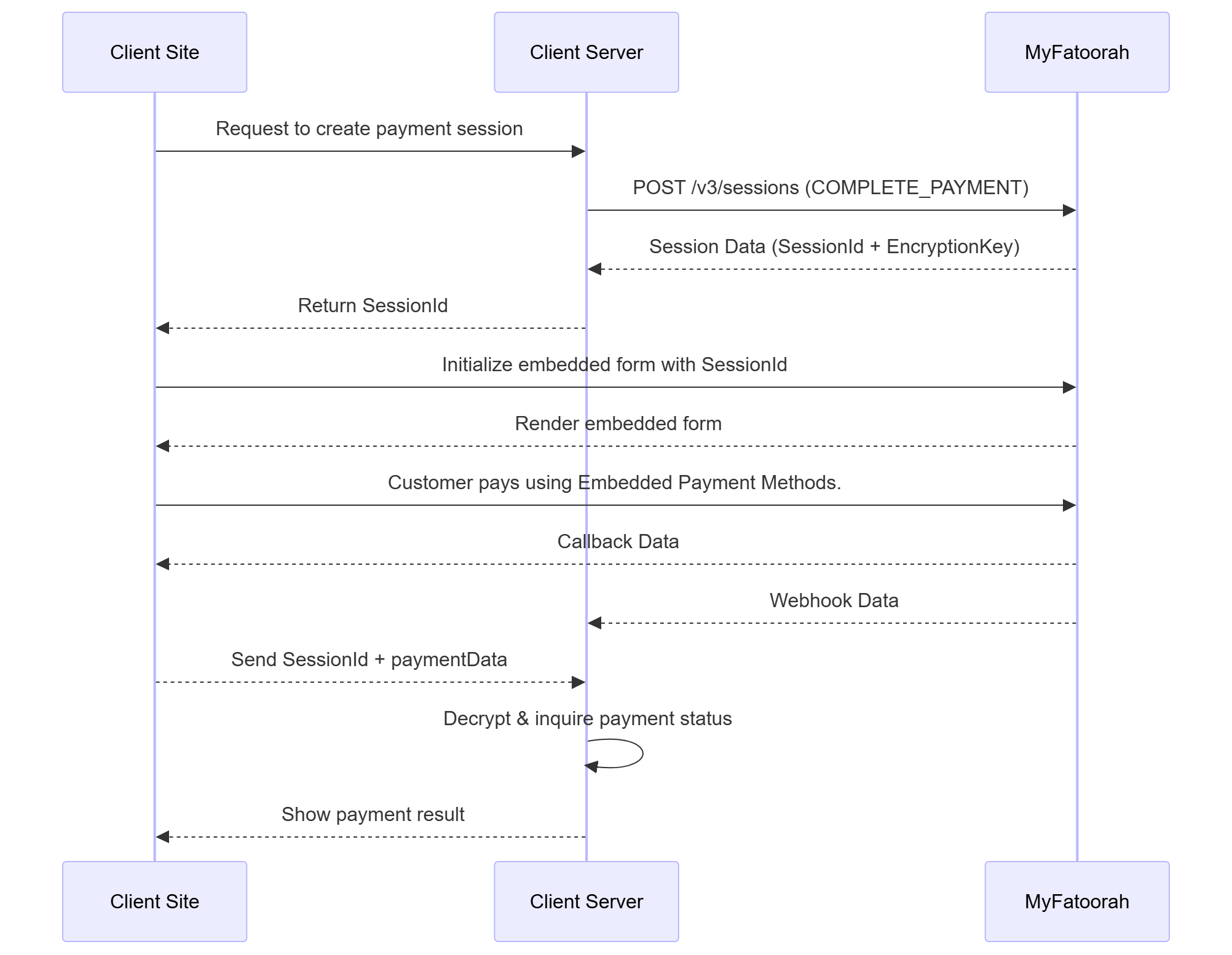
Complete Payment Mode (Embedded Methods, shouldHandlePaymentUrl = true)
-
Hosted Methods (e.g., KNET):
MyFatoorah automatically redirects the customer to the payment page. After the payment is completed, use thepaymentIdfrom the redirection URL to retrieve the payment status.
https://your-website.com/payment-callback?paymentId=07076127942302114071&Id=07076127942302114071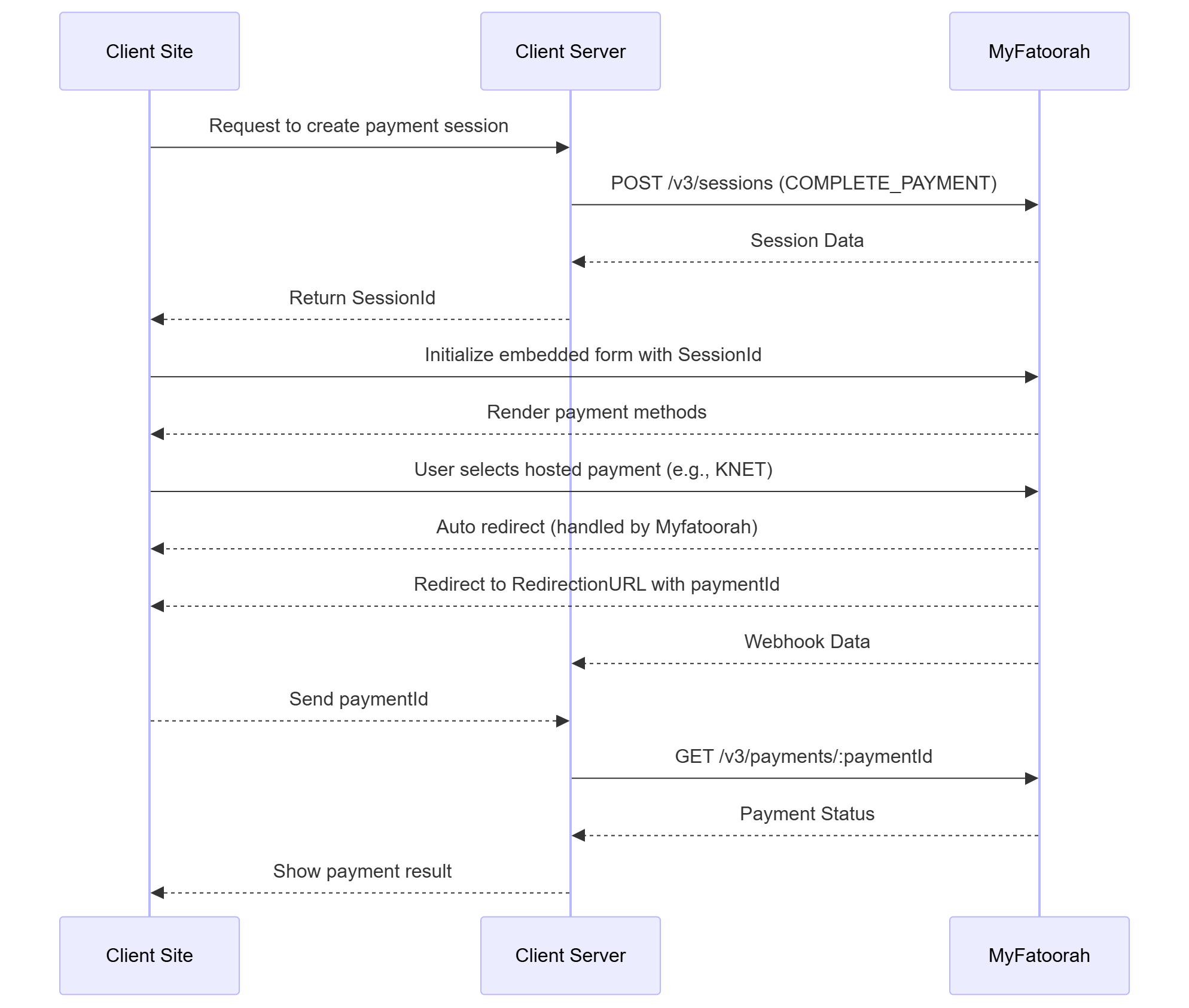
Complete Payment Mode (Hosted Methods, shouldHandlePaymentUrl = true)
-
-
If shouldHandlePaymentUrl: false:
-
Embedded Methods (Card/Apple/Google/STC Pay):
You must handle the OTP page either by displaying it in an iframe or by redirecting the user to it.{ "isSuccess": true, "paymentType": "CARD", "sessionId": "KWT-4f88aa92-94d1-433c-8043-2f7768c1a12a", "paymentCompleted": false, "card": { "brand": "Mastercard", "panHash": "b888aa5f23a817883d4d12c74044bab1ae6ee65dc8d6e11515394aba452b273b", "token": "", "number": "512345xxxxxx0008", "nameOnCard": "Hosam", "expiryYear": "34", "expiryMonth": "12", "issuer": "Test Bank", "issuerCountry": "KWT", "fundingMethod": "credit", "productName": "Mastercard Titanium" }, "redirectionUrl": "https://demo.MyFatoorah.com/En/KWT/PayInvoice/MpgsAuthentication?paymentId=07076389193322434173&sessionId=SESSION0002674591675H70711641I9&mfSessionId=4f88aa92-94d1-433c-8043-2f7768c1a12a", "paymentId": "07076389193322434173" } -
Hosted Methods (e.g., KNET):
You receive theredirectionUrlin the callback, and you must redirect the user to it to complete the payment.{ "isSuccess": true, "paymentType": "HOSTED_PAYMENT", "hostedPaymentName": "BENEFIT", "sessionId": "KWT-ac4ed8bb-0978-4cd5-883c-843ad4b82c65", "paymentCompleted": false, "redirectionUrl": "https://demo.MyFatoorah.com/En/KWT/PayInvoice/Checkout?invoiceKey=050712180638919562-fbd66d4f&paymentGatewayId=116" }
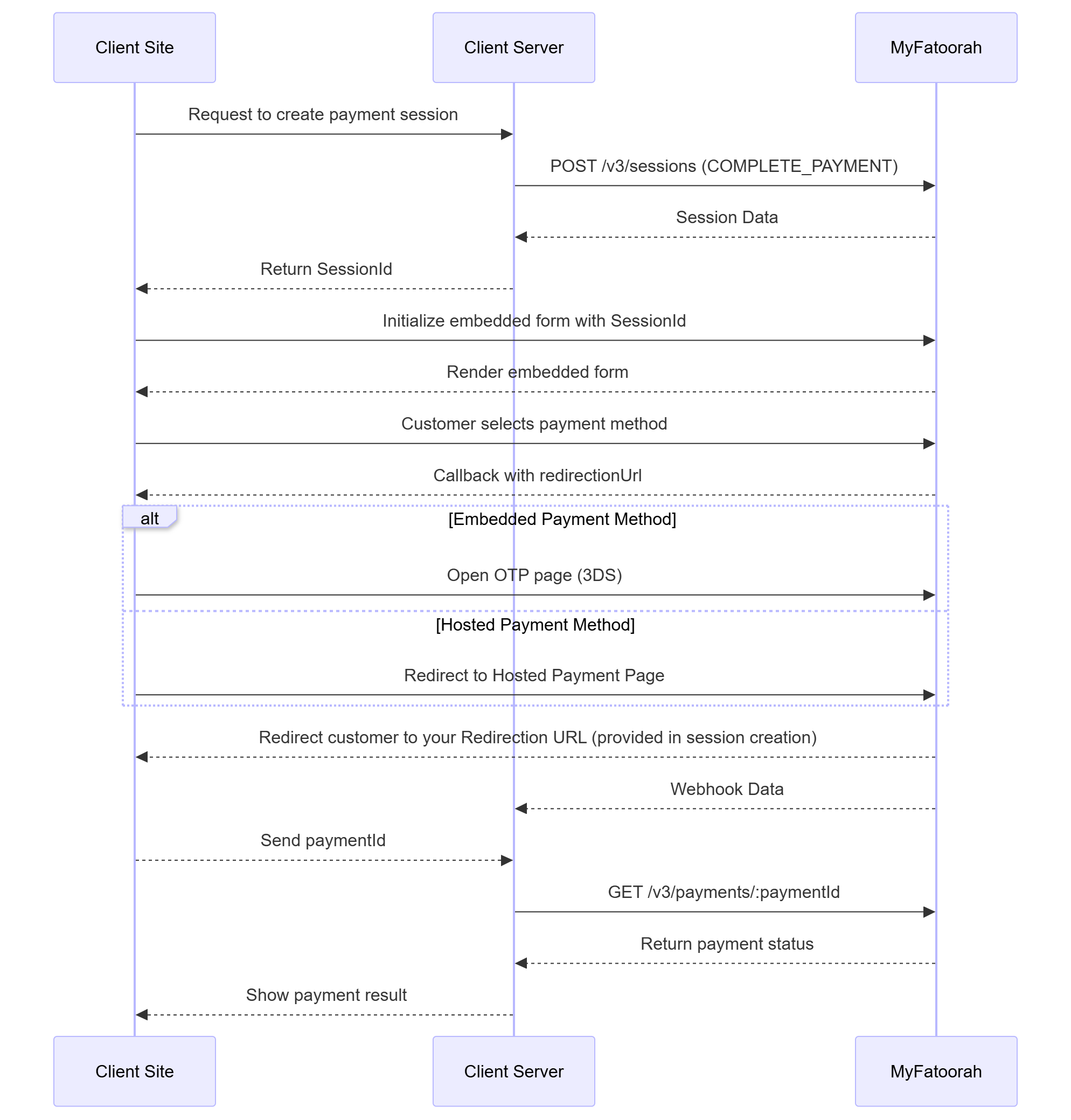
Complete Payment Mode (shouldHandlePaymentUrl = false)
-
OTP Page in an IframeTo know how to show the OTP page in an iframe, kindly check the following link: https://docs.myfatoorah.com/docs/otp-page-in-an-iframe/
Mode 2: Collect Details
This mode is a two-step payment integration approach that provides flexibility for complex pricing scenarios where you need to collect payment information first before processing the actual payment.
Step 1: Create Payment Session
Make a server-side API call to create a new payment session with PaymentMode: “COLLECT_DETAILS”
You need to do this for each payment separately. SessionId is valid for only one payment.
Endpoint: POST /v3/sessions (Create Session)
{
    "PaymentMode": "COLLECT_DETAILS",
    "Order": {
        "Amount": 10
    }
}
{
"IsSuccess": true,
"Message": "Created Successfully!",
"ValidationErrors": null,
"Data": {
"SessionId": "KWT-7b540311-6fcd-417d-b3a8-d7166cbbf773",
"SessionExpiry": "2025-09-29T00:13:14.4074096Z",
"EncryptionKey": "jWdKKGPFYmVykT6lpUIpKfuqQRKYraienXtLqhwGHRI=",
"OperationType": "PAY",
"Order": {
"Amount": 10.0,
"Currency": "KWD",
"ExternalIdentifier": null
},
"Customer": {
"Reference": null,
"Cards": null
}
}
}Step 2: Initialize Client-Side Integration
Include JavaScript Library:
// Test Environment
<script src="https://demo.myfatoorah.com/sessions/v1/session.js"></script>

// Live Environment For Kuwait, Bahrain, Jordan, and Oman
<script src="https://portal.myfatoorah.com/sessions/v1/session.js"></script>

// Live Environment For UAE
<script src="https://ae.myfatoorah.com/sessions/v1/session.js"></script>

// Live Environment For Saudi Arabia
<script src="https://sa.myfatoorah.com/sessions/v1/session.js"></script>

// Live Environment For Qatar
<script src="https://qa.myfatoorah.com/sessions/v1/session.js"></script>

// Live Environment For Egypt
<script src="https://eg.myfatoorah.com/sessions/v1/session.js"></script>
Create Container Element:
You need to define a div element with a unique id attribute. The Unified Session will be loaded inside this div after passing the div id to the configuration variable.
<div id="embedded-sessions"></div>
Configure and Initialize:
Now you need to add the configuration variables. Place the following snippet in a new script tag after loading the JavaScript library, and replace the sessionId parameter with the "SessionId" you receive from the POST /v3/sessions Endpoint.
var config = {
  sessionId: "KWT-56956bac-0bbe-437f-bf61-e629bd4aed4d", // Add the "SessionId" you received from POST Session Endpoint.
  callback: payment, // MyFatoorah triggers this callback after the customer completes payment, either by submitting card details, finishing Google Pay / Apple Pay / STC Pay, or choosing any hosted payment method.
  containerId: "embedded-sessions", //Enter the div id you created in previous step.
};

myfatoorah.init(config);

function payment(response) {
  console.log(JSON.stringify(response));
}
Step 3: Handle Payment Response
The callback function response depends on the chosen payment method.
{
	"isSuccess": true,
	"paymentType": "CARD",
	"sessionId": "KWT-56956bac-0bbe-437f-bf61-e629bd4aed4d",
	"paymentCompleted": false,
	"card": {
		"brand": "Mastercard",
		"panHash": "b888aa5f23a817883d4d12c74044bab1ae6ee65dc8d6e11515394aba452b273b",
		"token": "",
		"number": "512345xxxxxx0008",
		"nameOnCard": "Adel",
		"expiryYear": "34",
		"expiryMonth": "12",
		"issuer": "Test Bank",
		"issuerCountry": "KWT",
		"fundingMethod": "credit",
		"productName": "Mastercard Titanium"
	}
}
{
"isSuccess": true,
"paymentType": "HOSTED_PAYMENT",
"hostedPaymentName": "KNET",
"sessionId": "KWT-7b540311-6fcd-417d-b3a8-d7166cbbf773",
"paymentCompleted": false
}Step 4: Process Payment
Make a second API call to process the payment using the sameSessionId
and then redirect the customer to the PaymentURL to complete the payment process (OTP for cards or hosted payment page).
Endpoint: POST /v3/payments (Create Payment)
{
    "SourceOfFund": {
        "SessionId": "KWT-7b540311-6fcd-417d-b3a8-d7166cbbf773"
    },
    "Order": {
        "Amount": 23 // here you can update the amount of payment
    }
}
{
"IsSuccess": true,
"Message": "",
"ValidationErrors": null,
"Data": {
"InvoiceId": "6522848",
"PaymentId": "07076522848332706072",
"PaymentURL": "https://demo.MyFatoorah.com/En/KWT/PayInvoice/MpgsAuthentication?paymentId=07076522848332706072&sessionId=SESSION0002142880473I8690260J63&mfSessionId=282901aa-1fcb-4832-b181-d14021d87e9f",
"PaymentCompleted": false,
"TransactionDetails": null,
"Card": {
"Number": "512345xxxxxx0008",
"ExpiryMonth": "01",
"ExpiryYear": "39",
"Brand": "Mastercard",
"PanType": "Card",
"Issuer": "Test Bank",
"PanHash": "b888aa5f23a817883d4d12c74044bab1ae6ee65dc8d6e11515394aba452b273b",
"Token": "",
"NameOnCard": "test",
"IssuerCountry": "KWT",
"FundingMethod": "credit",
"ProductName": "Mastercard Titanium",
"IsValidCard": null,
"Is3DSVerified": false
}
}
}{
"IsSuccess": true,
"Message": "",
"ValidationErrors": null,
"Data": {
"InvoiceId": "6522896",
"PaymentId": null,
"PaymentURL": "https://demo.MyFatoorah.com/En/KWT/PayInvoice/Checkout?invoiceKey=050754719652289664-ea785323&paymentGatewayId=1121",
"PaymentCompleted": false,
"TransactionDetails": null,
"Card": {
"Number": "",
"ExpiryMonth": "",
"ExpiryYear": "",
"Brand": "",
"PanType": "",
"Issuer": "",
"PanHash": "",
"Token": "",
"NameOnCard": "",
"IssuerCountry": "",
"FundingMethod": "",
"ProductName": "",
"IsValidCard": null,
"Is3DSVerified": false
}
}
}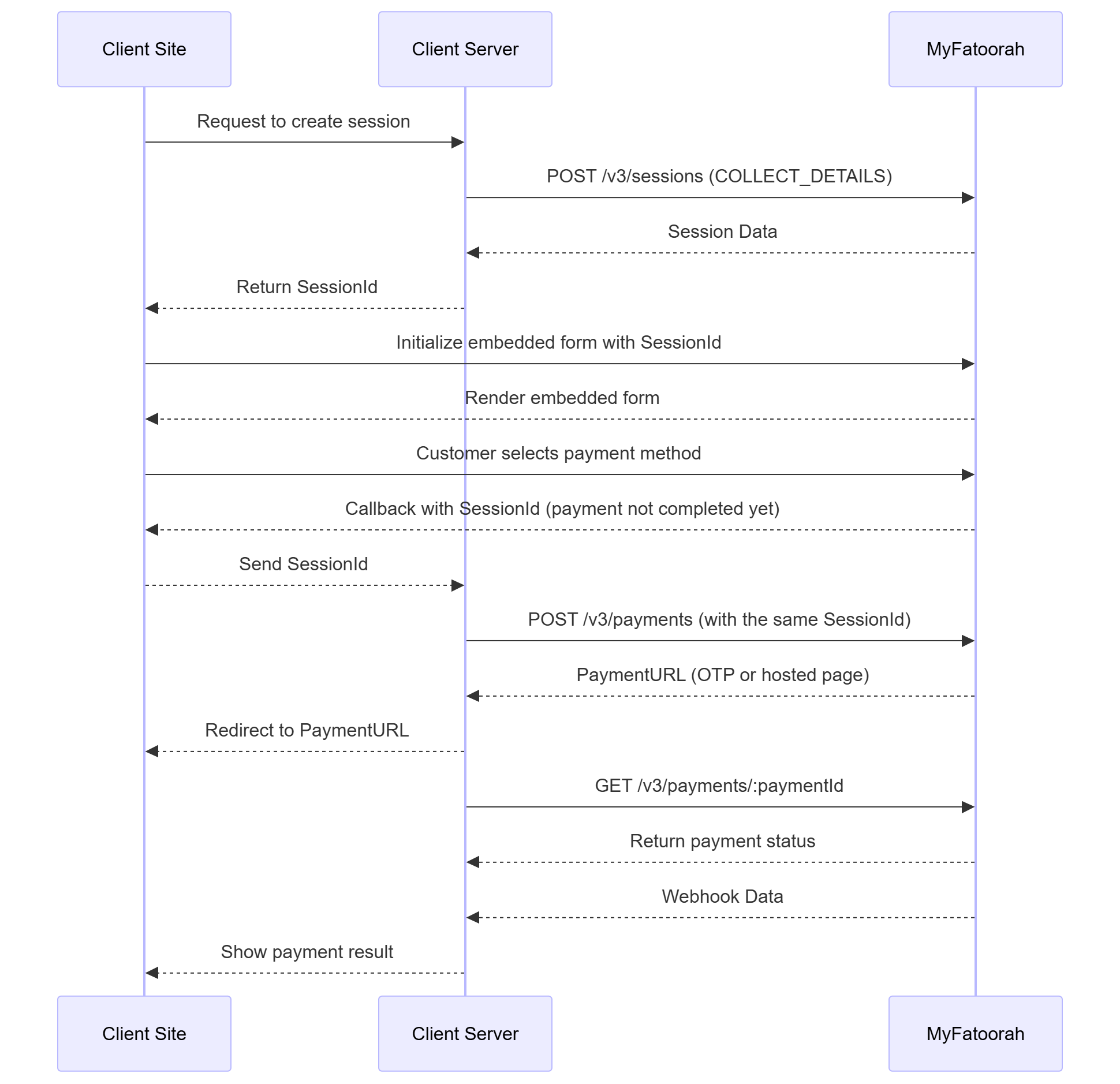
Collect Details Mode
NoteThe following parameters cannot change between POST /v3/sessions and POST /v3/payments:
- OperationType
- 3ds model
Payment StatusAlways use Webhook with the Get Payment Details endpoint to confirm the final payment status.
Old Integration (V2)In case you are using the integration for v2, you can find the documentation here:
Native IntegrationIf you need to integrate Wallets using Native Integration, please refer to the following guide: Native Wallet Integration
Updated 8 months ago